Stop Manual Entry.
Automate M-Pesa
to QuickBooks.
Save 10+ hours every week. Automatically sync M-Pesa Paybill and Till payments to QuickBooks Online in real-time. Zero errors. Zero hassle. 2-week free trial.
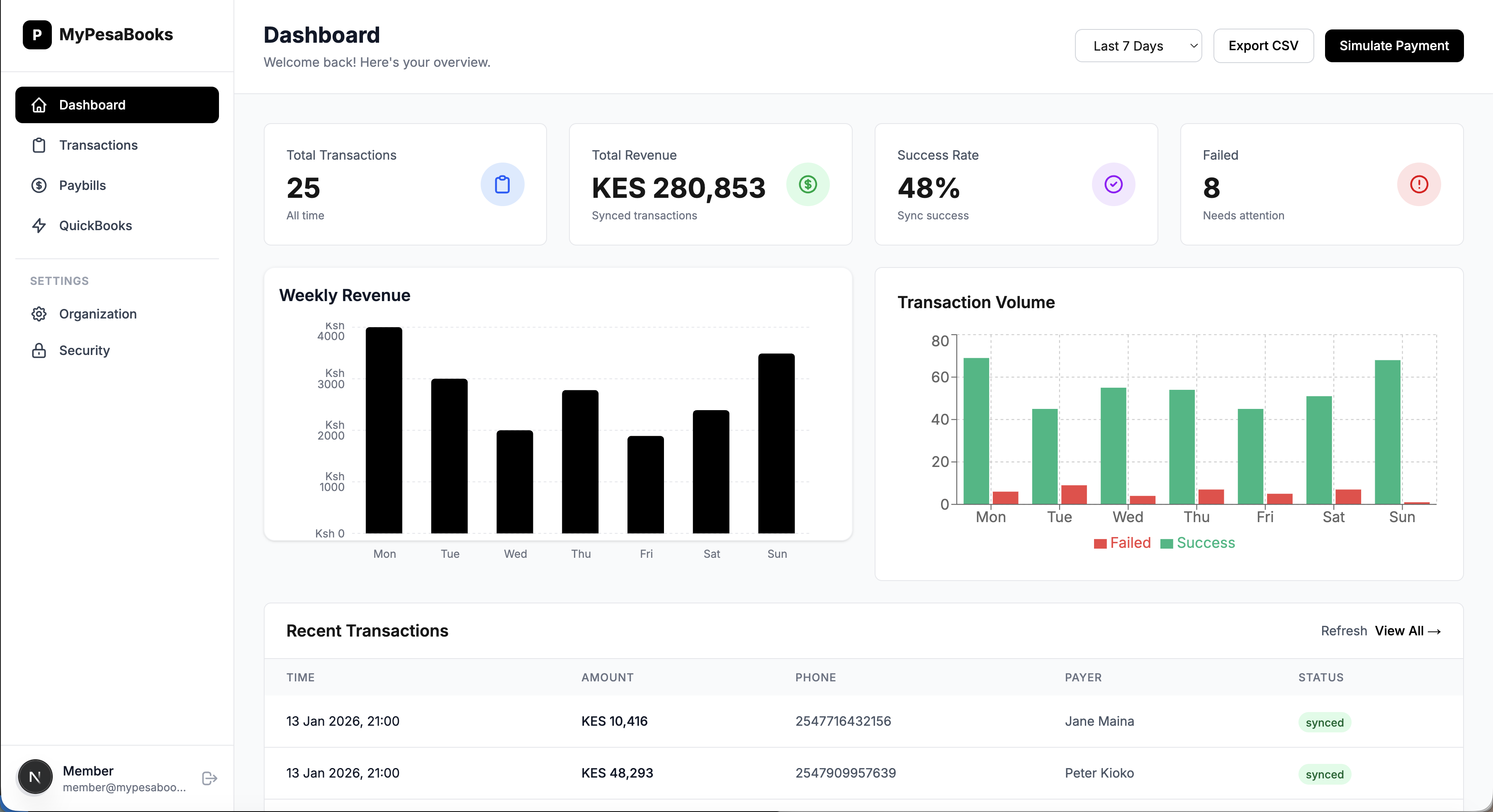

Everything You Need to Automate Your Accounting
Built for Kenyan businesses. Optimized for M-Pesa and QuickBooks.
Real-Time Sync
M-Pesa payments appear in QuickBooks instantly. No delays, no manual work.
Bank-Level Security
AES-256 encryption, HTTPS, and enterprise-grade security. Your data is safe.
Multiple Paybills
Manage unlimited M-Pesa paybills and tills from one dashboard.
Detailed Analytics
Track revenue, transaction trends, and sync status in real-time.
Auto-Retry Failed Syncs
Smart retry logic ensures no transaction is ever lost.
Team Collaboration
Invite team members with role-based access control.

Get Started in 3 Simple Steps
From signup to first sync in under 5 minutes.
Connect QuickBooks
One-click OAuth connection. No technical setup required.
Add M-Pesa Paybill
Enter your Safaricom credentials. We handle the rest.
Start Syncing
Payments automatically appear in QuickBooks. Done!
Simple, Transparent Pricing
Start free. Scale as you grow. Cancel anytime.
Business
- 5 Paybills
- Unlimited transactions
- Priority support
- Advanced analytics
Need help getting started?
Get our Concierge Setup Service. We'll handle the technical configuration of your M-Pesa Org and Daraja accounts for you.
Frequently Asked Questions
How does MyPesaBooks work?
MyPesaBooks connects to your M-Pesa Paybill via Safaricom's Daraja API and your QuickBooks Online account via OAuth. When a customer pays via M-Pesa, we automatically create a sales receipt in QuickBooks in real-time.
Is my data secure?
Yes! We use bank-level AES-256 encryption, HTTPS, and enterprise-grade security. Your M-Pesa credentials are encrypted at rest. We're GDPR compliant and follow Kenya's Data Protection Act.
Do I need technical knowledge?
No! Setup takes 5 minutes with our step-by-step wizard. Just connect QuickBooks (one click), add your M-Pesa paybill details, and you're done.
Can I sync historical M-Pesa transactions?
Yes, on the Business and Enterprise plans, you can sync up to 12 months of historical M-Pesa transactions into QuickBooks with a single click.
Do you support multiple currencies?
Yes, we support multi-currency syncing. M-Pesa transactions are recorded in KES, but QuickBooks handles the conversion if your base currency is different.
What happens if M-Pesa is down?
Our system queues your transactions securely. Once M-Pesa is back online, we automatically retry and sync all pending payments so your books are always accurate.
How are M-Pesa transaction charges handled?
We automatically record the transaction fee as a separate expense line item in QuickBooks. This ensures your M-Pesa account balance matches your bank statement perfectly.
Do you support both Paybills and Buy Goods (Tills)?
Yes! You can connect as many Paybill and Buy Goods (Till) numbers as you need. We support both Shortcode types seamlessly.
Can I invite my accountant?
Absolutely. You can invite your accountant or team members to your dashboard. This allows them to monitor sync status without sharing your credentials.
Is there a long-term contract?
No. MyPesaBooks is a month-to-month service. You can upgrade, downgrade, or cancel your subscription at any time with no penalties.
Does this help with KRA Compliance?
Yes. By ensuring every single sale is recorded in real-time, your revenue figures are always accurate. This makes filing your VAT and Income Tax returns faster and error-free.
Refer & Earn with MyPesaBooks
Know other businesses struggling with M-Pesa accounting? Refer them to MyPesaBooks and earn KES 500 for every successful subscription.
- Automatic referral code upon signup
- Earn when they pay their first invoice
- Withdraw directly to M-Pesa (min KES 1,000)
- No limit on earnings

Ready to Save 10+ Hours Every Week?
Automate your M-Pesa accounting.
No credit card required • Cancel anytime • 14-day free trial